Visitant on WordPress
A small plugin adds cookie-free statistics to every page and, with one key pasted in, also counts the AI robots that read your site. No code to edit, no cookie banner, and you are not counted while you are logged in.
What you need
- A WordPress site where you can install plugins (the Administrator role; on WordPress.com a plan that allows plugins).
- A free Visitant account with your site added (Free covers 5,000 events a month on 2 sites).
- Optional, for AI robots: the Server key from your Visitant dashboard, Settings - AI crawler tracking (server).
Setup in 5 steps
-
01 Download the plugin
Download visitant-wordpress.zip (about 5 KB). Keep it as a zip file - WordPress installs the zip itself, there is nothing to unpack.
Safari on a Mac sometimes unpacks downloads automatically. If you see a visitant folder instead of a zip, download it again in another browser or right-click the folder and choose Compress.
-
02 Upload it in WordPress
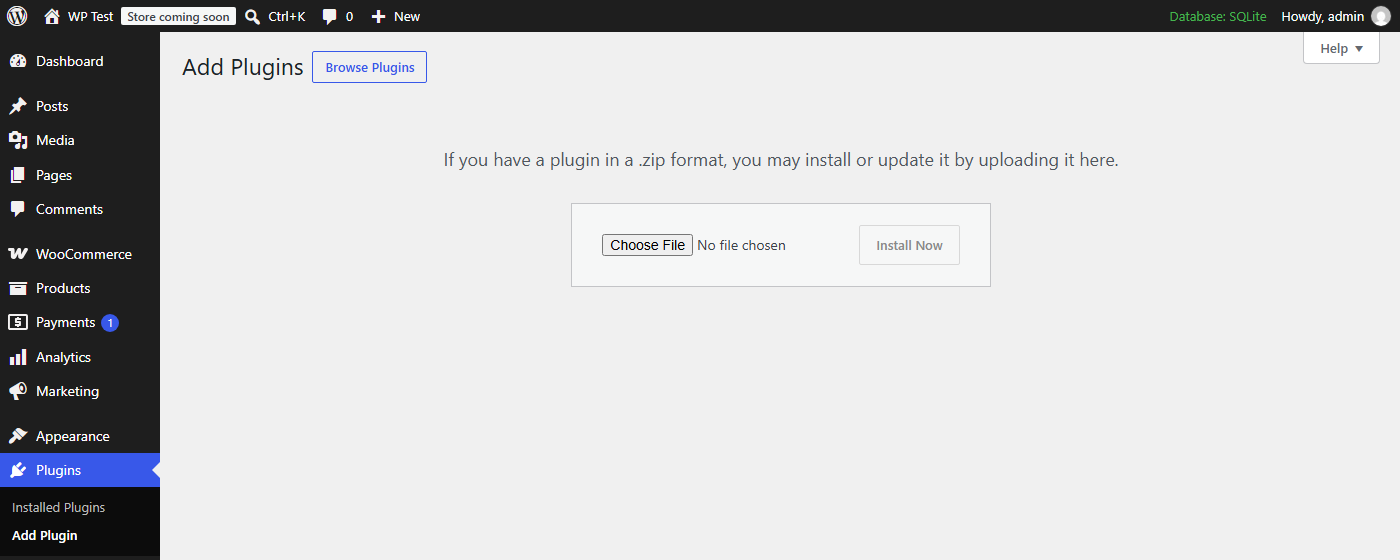
In your WordPress dashboard go to Plugins - Add Plugin and click Upload Plugin at the top. Choose the zip file and click Install Now. Older WordPress versions call the first button Add New.
-
03 Activate Visitant Analytics
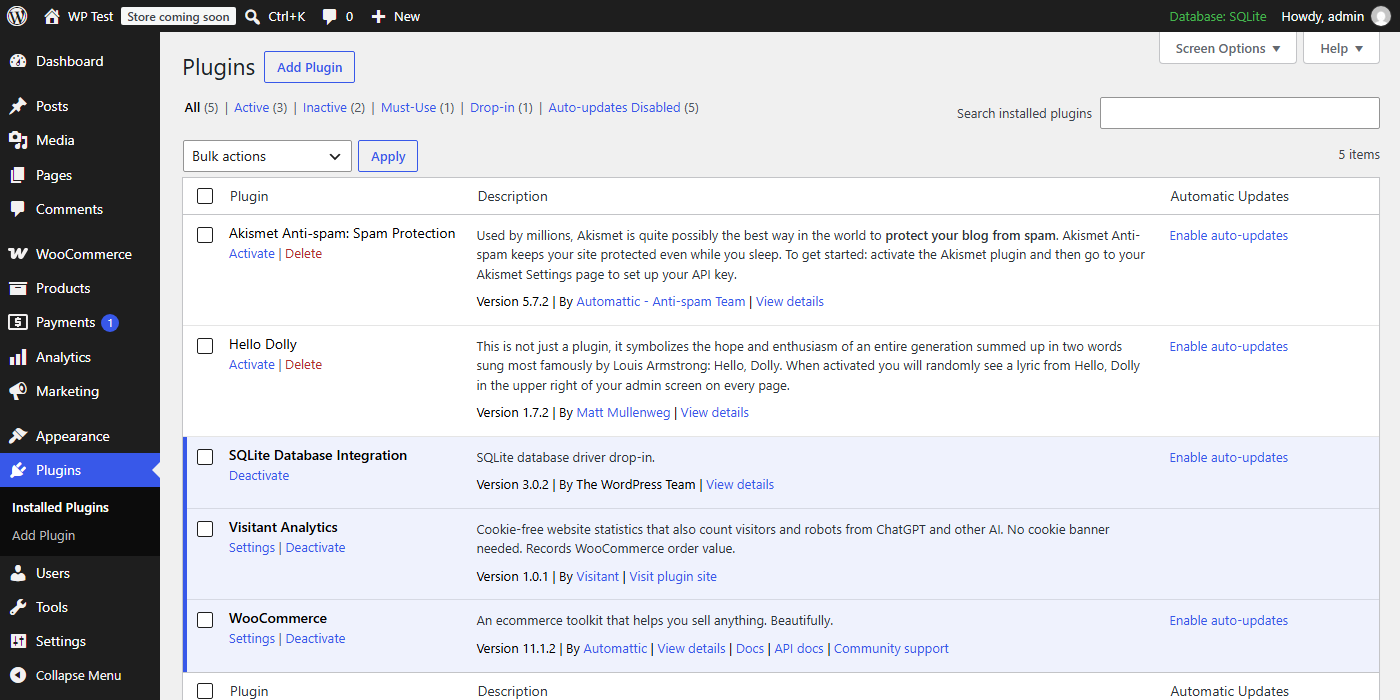
After the upload click Activate Plugin. Visitant Analytics now appears in your plugin list with a Settings link. From this moment the stats script is on every page of your site.
-
04 Enter your domain and key
Go to Settings - Visitant. Domain: the same as in your Visitant dashboard, without
https://and withoutwww(if you paste a full address, the plugin cleans it up). Server key: paste the key from the dashboard if you want AI robots counted. Leave Skip logged-in editors and admins ticked and click Save Changes. The What is on list below the form confirms what is working.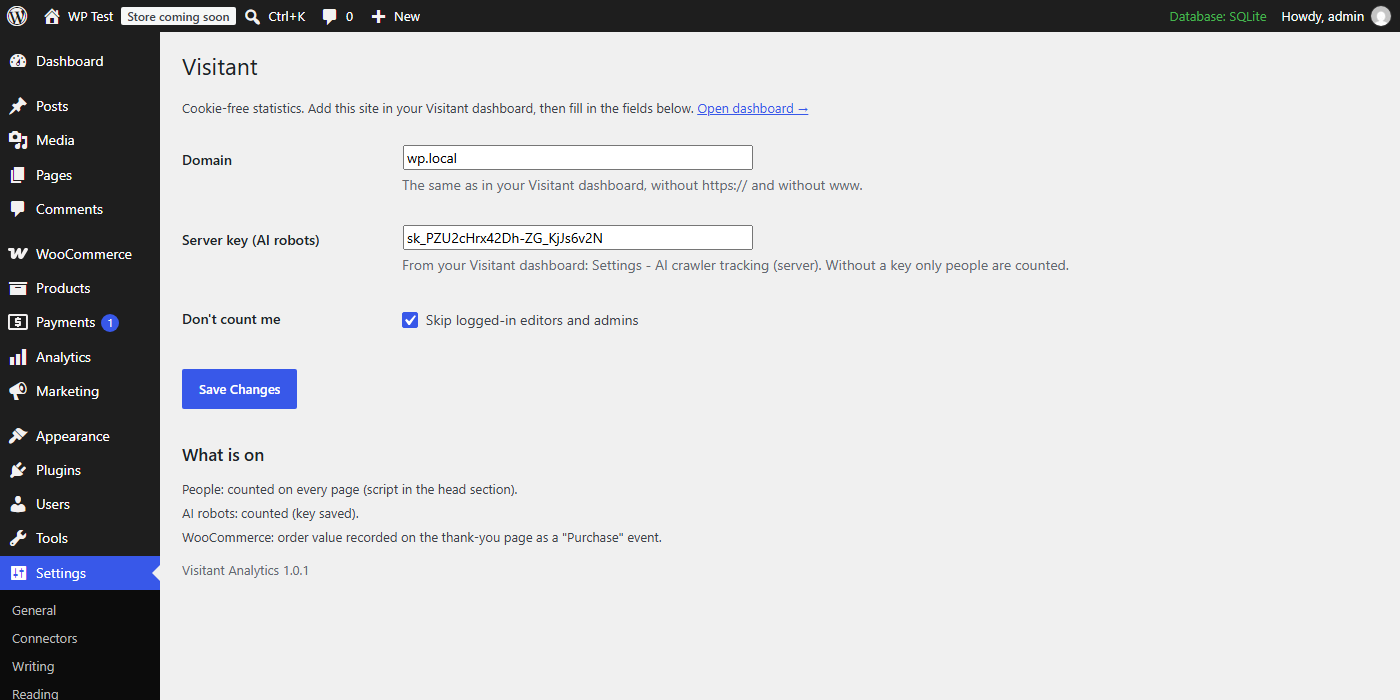
Without the key only people are counted. With it, the plugin reports AI robots such as GPTBot, ClaudeBot and PerplexityBot from your server - only robots, never people - together with the page they read and whether it answered 200, 301 or 404.
-
05 Clear the cache
If you use a cache plugin (WP Rocket, LiteSpeed Cache, W3 Total Cache and similar) or a hosting cache, purge it once, so that cached pages also get the new script. Then open your site in a private browser window - as a logged-in admin you are deliberately not counted.
Prefer not to add a plugin? Any header-code plugin (WPCode and similar) works too: paste
<script defer data-domain="yoursite.com" src="https://annuora.com/v.js"></script>into the header field and change the domain. You then get people only - no AI robots and no WooCommerce order values, which only the Visitant plugin sends.
Is it working? Check in 60 seconds
Keep the Visitant dashboard open in one tab and your site in a private window in another.
- Open any page of your site: the current visitors counter at the top of the dashboard shows 1 within a few seconds.
- In the private window view the page source (
Ctrl+U) and search forv.js: one line withdata-domainset to your domain. In your normal, logged-in window the line is missing - that is the Don't count me option, not an error. - Settings - Visitant shows AI robots: counted (key saved) under What is on.
- The AI crawlers reading your site panel fills when robots visit. How soon depends on your site - in our experience a blog is read by at least one AI robot within a day or two.
Common problems
| Nothing shows up in the dashboard | Most often you are testing while logged in, and logged-in editors and admins are skipped on purpose - use a private window. Next, check that the domain in Settings - Visitant matches the site in your dashboard exactly, and purge your cache plugin. |
| WordPress says "No valid plugins were found" | The uploaded file is not the original zip - usually a folder that was unpacked and packed again. Download the zip again and upload it without opening it. |
| The AI robots panel stays empty | Check that What is on says the key is saved. Pages served straight from a full-page cache or a CDN never reach WordPress, so the plugin cannot see robots on them; for full coverage add the Cloudflare or nginx option from Settings - AI crawler tracking (server) in the dashboard. |
| Every visit is counted twice | The line was added earlier by hand (in the theme or a header-code plugin) and the plugin adds it again. Remove the old line so that v.js appears once in the page source. |
Questions
Do I need a cookie banner for Visitant?
No. The script sets no cookies, stores nothing in the browser and never stores IP addresses, so there is nothing to ask consent for. Data is hosted in the EU.
Will the plugin slow my site down?
The script is under 2 KB gzipped and loads with defer, so it never blocks your page. The server part runs only when a robot visits, and on PHP-FPM and LiteSpeed hosting it sends its report after the robot already has the page.
Do AI robots count toward my monthly limit?
No. Robot visits are stored separately and never count toward your events, on every plan including Free. Only human page views and events do.
Does it work with WooCommerce?
Yes, the same plugin also records the value of each order on the thank-you page. See the WooCommerce guide for exactly what is and is not recorded.
Create a free account - the dashboard shows these steps with your own domain and key filled in.
Start free →